> For the complete documentation index, see [llms.txt](https://help.chatlyai.app/llms.txt). Markdown versions of documentation pages are available by appending `.md` to page URLs; this page is available as [Markdown](https://help.chatlyai.app/products-and-features/ai-docs/what-are-ai-docs.md).
# What are AI Docs?
AI Docs is an AI-powered document workspace that enables content generation, summarization, rewriting, and contextual understanding of documents through natural language instructions.
### Two Editing Modes
AI Docs offers two powerful ways to work, depending on your workflow and design needs:
#### Plain Mode
A clean, AI-enabled markdown editor designed for focused writing and structured content creation.
* Minimal, distraction-free interface
* Markdown-based formatting
* Ideal for reports, documentation, research, and structured writing
* AI assistance built directly into your writing flow
* Similar to a Notion-style intelligent editor
Best for clarity, speed, and content-first workflows.
#### Studio Mode
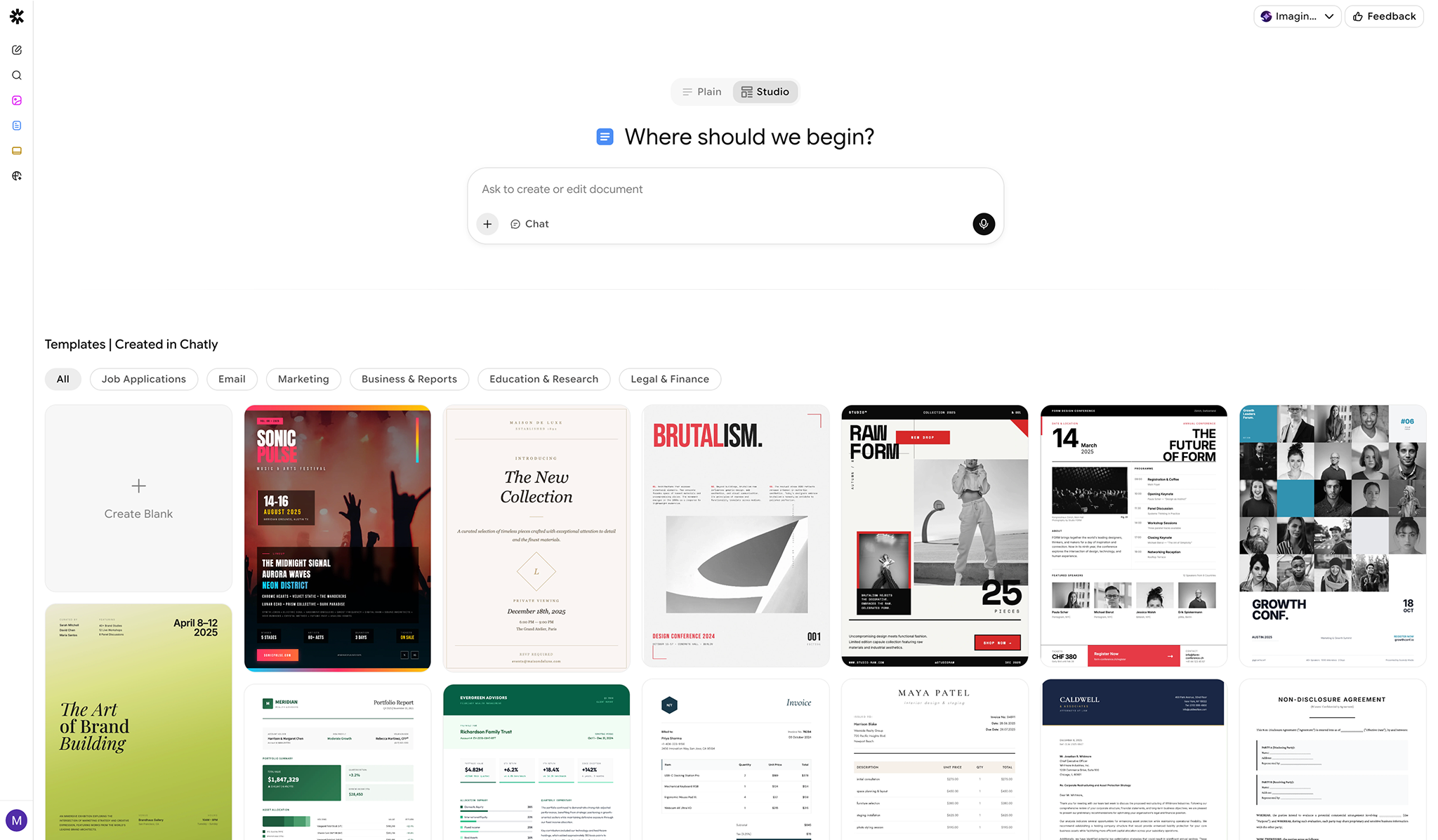
A visual, HTML canvas-based editor for rich layouts and design flexibility.
* Drag-and-drop style editing
* Advanced layout control
* Rich formatting and visual customization
* Ideal for polished documents, branded materials, and presentation-style content
* Mix design, structure, and AI seamlessly
Best for design-heavy, visually structured documents.
#### Getting Started with AI Docs
You can create a document in three ways:
* **Blank document** – Start with an empty canvas and build your content manually or with AI
* **Prompt-based creation** – Describe what you want, and AI generates a structured document
* **Templates** – Choose from pre-built templates for common use cases. You can choose from:
* Job Applications
* Email
* Marketing
* Business & Report
* Education & Research
* Legal & Finance
* Markdown Templates
#### Editing & Writing with AI
AI Docs allows you to improve your documents using:
1. **Edit on Canvas** – Edit or refine specific parts of your document through conversation with AI. Just select the part you want to edit
2. **Fix Grammar** – Automatically rewrites and improve selected sections for grammar, punctuation, and general english improvements.
3. **Shorten** – Summarize selected content into concise, easy-to-digest points.
4. **Extend** – Expand selected points with additional detail and explanation.
5. **Chat Mode** – You can use the **Chat Mode** to plan and research your document without the agent hallucinating! Just select the "**Chat**" option from the prompt box and ask whatever you want!
All AI changes can be reviewed and edited manually at any time.
#### Manual Editing & Rich Content
In addition to AI editing, you can:
* Manually edit text and formatting
* Insert images, files, and links
* Mix AI-generated and human-written content seamlessly
* Customize layouts and structure freely
AI Docs works like a full document editor with AI assistance built in.
### Files, Images & Attachments
* **Documents**: `.pdf`, `.docx`, `.pptx`, `.xlsx`, `.txt`, `.csv`, `.json`, `.md`, `.html`, `.epub`
* **Images**: `.jpg`, `.jpeg`, `.png`, `.gif`, `.webp`
* **File size**: up to 25 MB per file.
* **Maximum files per document**: Up to 5 files
* **Maximum file size**: 20 MB per file
### AI Tools Available in Docs
AI Docs supports the following AI-powered actions:
* Search documents
* Understand images
* Analyze External Links Provided
* **Search the internet** to gather and reference information
These tools help enrich your document with context, research, and external data.
### Exporting Documents
You can manually export your documents in standard formats for PDF and HTML.
#### Supported Export Formats
* PDF
* HTML
* Docx - Plain Docs only
* Markdown - Plain Docs only
Exports preserve structure, formatting, and embedded content.
---
# Agent Instructions
This documentation is published with GitBook. GitBook is the documentation platform designed so that both humans and AI agents can read, navigate, and reason over technical content effectively. Learn more at gitbook.com.
## Querying This Documentation
If you need additional information that is not directly available in this page, you can query the documentation by asking a question.
Perform an HTTP GET request on the following URL with the `ask` and `goal` query parameters:
```
GET https://help.chatlyai.app/products-and-features/ai-docs/what-are-ai-docs.md?ask=&goal=
```
`ask` is the immediate question: it should be specific, self-contained, and written in natural language.
`goal` is what the user is ultimately trying to achieve, the reason they need the answer. Sharing it helps GitBook give you a better, more relevant answer. A goal is most helpful when it describes the outcome the user wants rather than restating the question. For example, with `ask=how do I create an API token`, a goal like `automate deployments from our CI pipeline` lets GitBook tailor the answer to that use case.
The response will contain a direct answer to the question and relevant excerpts and sources from the documentation.
Use this mechanism when the answer is not explicitly present in the current page, you need clarification or additional context, or you want to retrieve related documentation sections.